


Renovate AI : House Design
4.694.00 Reviews
App Specs
- Version
- 5.2.7
- Updated On
- License
- Free
- Downloads
- 100,000+
- Developer
- Trial & Error AI
- Categories
- House & Home
- Platform
- Android
Screenshots
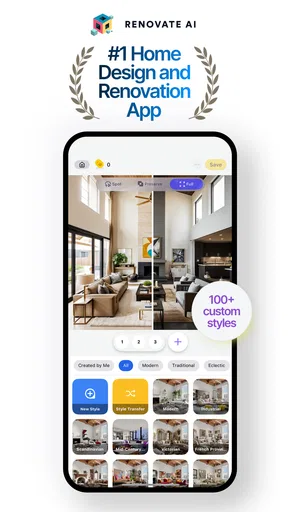
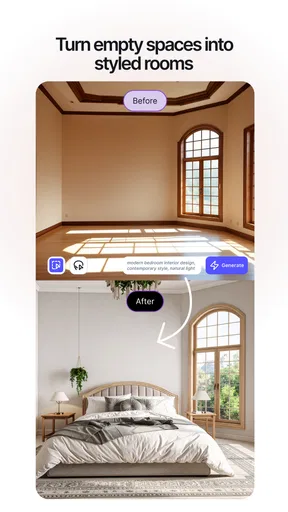

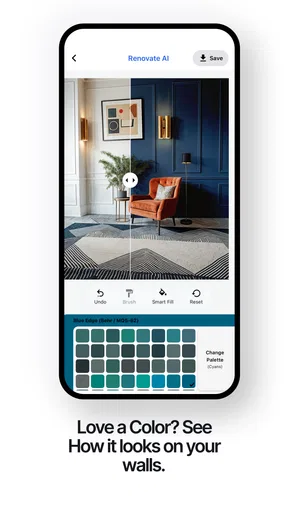
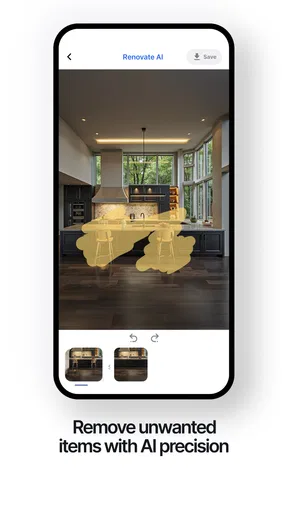
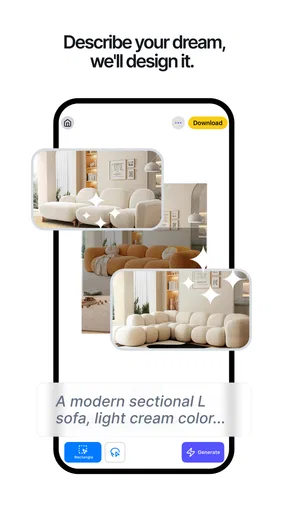
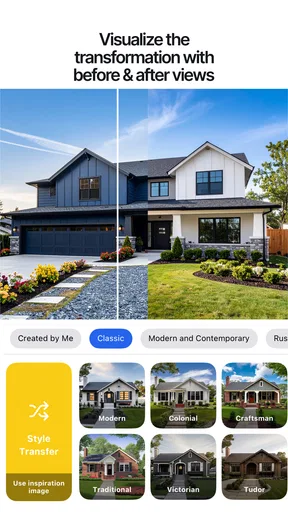
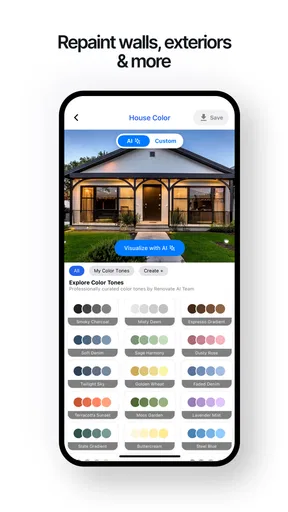
 Analysis by AppCompare
I like home-design apps most when they help me make a real decision, not just produce a pretty room I’ll forget about. Renovate AI: House Design is aimed at that early, uncertain stage: you have a room, an idea, and no clear picture of whether the two will work together. Its appeal is immediate, but its lasting value depends on whether you use the visuals to guide practical choices rather than treat them as a finished renovation plan.
The first-week appeal: turning a vague idea into a visual
In the first session, the main draw is seeing a familiar space presented with a different look. Instead of trying to imagine a new wall color or arrangement from a small sample, I can start with a photo and use the app to explore possibilities. That makes it easier to explain an idea to someone else, especially when “something warmer” or “less cluttered” is all I can initially articulate.
A useful way to begin is to photograph the room in ordinary, even lighting and from a position that shows as much of it as possible. Then I’d change one broad element at a time—such as the overall style or color direction—before layering in smaller choices. If I alter everything at once, I may like the result without knowing which change actually improved it. Keeping a few distinct versions gives me a more meaningful comparison than making a long chain of tiny edits.
This is particularly helpful before low-commitment decisions: choosing a mood for a guest room, discussing a living-room refresh with a partner, or deciding whether a home office should feel calmer or more energetic. The image can make the conversation concrete. It is less useful as proof that a particular sofa will fit or that a renovation detail can be built exactly as pictured; a visual concept is a starting point, not a measurement or construction document.
Why the app can be useful beyond the novelty
Renovate AI is a free House & Home app from Trial & Error AI. It has a 4.4 average from around 2.8 thousand ratings, with more than 100 thousand installs, and is rated for Everyone. It was released on July 7, 2023, and version 4.4.73 requires Android 7.0 or later. The app is free to download, with in-app purchases ranging from $4.99 to $99.99 per item, so I’d check the purchase details before relying on any paid option for a project.
The best recurring use is not necessarily redesigning the whole home every month. I’d return when a specific choice comes up: whether a color scheme suits the room, how a different style might change its feel, or what direction to show a decorator before discussing the actual work. A saved design can serve as a visual reference, but I’d pair it with measurements, product research, and a realistic budget. That division of labor keeps the app useful without asking an AI-generated image to answer questions it cannot settle.
There is also a practical benefit to comparing before buying. If I’m tempted by a dramatic change, a visual draft can prompt me to pause and ask whether it works with the room’s existing light, fixed finishes, and furniture I plan to keep. That may help prevent an impulsive purchase, but it does not guarantee less waste on its own. The responsible step is to use the mock-up to narrow choices, then verify dimensions, materials, availability, and costs elsewhere.
Worth Reading Before You Choose

EA SPORTS FC Mobile 26 Is a Bigger Football Game, but It Takes Time

Flipboard Shows What News Apps Must Do Beyond the Feed

Switching to Android Auto Means Rethinking Your Driving Routine

Google Calendar Makes a Crowded Week Easier to Manage

Ludo King Makes the Most of the Minutes Between Plans

Baby Panda World Brings Quick Play to Modern Phones, but Its Game Library Feels Busy
What it does well—and where I’d be careful
The app’s strongest role is idea generation. It offers a quick way to explore different looks without first learning a complicated design program, and the image-based workflow is approachable for someone who has never planned a room. That makes it a good fit for renters or homeowners who want inspiration, people preparing to discuss a refresh with family, and anyone who finds it hard to translate a mood-board idea into their own space.
I would not use it as my only tool for a renovation with precise constraints. A generated room image can make proportions, finishes, or furnishings look more convincing than they are in practice. It is not a substitute for measuring a doorway, checking whether furniture can pass through it, testing paint in the room’s actual light, or consulting a qualified professional about structural, electrical, or plumbing work. If accuracy is the main requirement, a measured floor-plan or professional design service is a better next step.
For day-to-day use, I’d also keep the workflow focused. Save a baseline photo, make a small set of clearly different concepts, and label them by the decision they represent—such as “lighter walls” or “keep existing sofa.” That is more useful than collecting many nearly identical images. When sharing a design for feedback, ask a concrete question rather than “Do you like it?” People can give more actionable opinions about a particular color direction or layout idea than about an entire imaginary makeover.
Getting Started with Renovate AI
So, diving right into the app, the first thing you'll notice is its sleek and user-friendly interface. Navigating through the options is a breeze, which is a blessing if you’re like me and get overwhelmed with techy stuff. Once you're in, the app offers a quick tutorial that guides you through its main features. It’s perfect for us impatient folks who just want to jump right into designing.
After the initial setup, you can either take a picture of your space or upload one from your gallery. The AI technology behind the app is genuinely impressive. It scans the room and gives you a 3D model to work with. Talk about feeling like a pro designer without the fancy degree!
Features That Make It Stand Out
What really caught my eye was the vast array of design elements available. Whether you're into modern, rustic, or something in between, Renovate AI has something for everyone. You can experiment with different furniture, colors, and even wall textures. It’s like having a virtual IKEA right in your pocket.
One of my favorite features is the "Style Match" tool. Snap a pic of any piece of furniture or decor you love, and the app will find similar items you can try out in your space. It’s a lifesaver for those moments when you see something beautiful but have no idea where to find it.
Playing Designer
Now, let’s talk about the actual design process. It's not just fun; it's a little addictive. I spent hours playing around with different looks for my living room. The app lets you save your designs and even share them with friends. So, if you’re indecisive like me, you can get some second opinions before making any major changes.
Another cool aspect is the "Cost Estimator" feature. It gives you an idea of how much your dream design might set you back. It’s super handy for staying within budget and avoiding any financial surprises.
Keeping it useful after the first session
When the initial excitement wears off, I think the app earns its place through occasional, decision-led visits rather than daily use. A realistic example: I’m considering refreshing a living room but keeping the main furniture. I can take a room photo, try a few directions, save the strongest options, and show them to the people who share the space. Their reactions can help me narrow the brief before I spend money or speak with a decorator.
The trade-off is that a polished image can make a concept feel more settled than it is. I’d treat the result as a conversation aid, not a shopping list. For instance, I would not assume a generated chair is available to buy, or that an estimated project cost captures local labor, delivery, or the exact products I choose. The app can help me decide what to investigate; the follow-up checks still happen outside it.
Compared with a general mood board, Renovate AI has the advantage of starting from a photo of my own room, which makes an idea easier to relate to the space. A conventional interior-design service is the stronger choice when I need measured plans, sourcing, or accountability for a complex job. A standard photo editor gives more manual control over an image, but demands more effort and design skill. I see this app as the middle ground for quick visualization—not a replacement for either professional planning or careful product research.
Maintenance, costs, and sources of fatigue
There is little routine upkeep involved in using a visual design app, but the projects themselves still need sensible organization. I’d keep the original room photo and a small number of useful alternatives rather than repeatedly generating new versions without a decision in mind. That habit makes it easier to remember what I liked and why, and reduces the chance that a pile of attractive concepts becomes its own distraction.
Another possible source of fatigue is choice overload. If I test too many styles in one sitting, the differences blur together and I may end up chasing novelty rather than solving the room’s problem. A better approach is to set one question before opening the app: should the room feel brighter, should I explore a different style, or do I want a reference image for a conversation? When that question is answered, I can stop and move on to practical checks.
The free download makes it easy to try, but the presence of in-app purchases means I would pay attention to what an option costs before making it part of my routine. I’d first see whether the basic experience helps with my actual decisions; if not, paying for more inspiration would not fix the underlying mismatch. People who want precise measurements, a complete renovation plan, or guaranteed product matches are better served by tools and professionals built for those tasks.
Who should keep it—and who should move on
I’d recommend trying it if you’re at the “I can’t picture it yet” stage, enjoy experimenting with room styles, or need a visual way to discuss ideas with someone else. It is especially handy when a change is still hypothetical and you want to compare broad directions before committing. I’d skip it as a primary planning tool if the project depends on exact dimensions, technical drawings, verified product availability, or professional construction advice.
Whether it remains useful over time depends on how often real home decisions arise. I don’t need to open it just to keep it installed; a tool can earn its space by being ready when a room needs attention. For me, the lasting value is in turning a vague preference into a clearer brief, then handing that brief off to measurements, shopping, or expert help. Used that way, Renovate AI: House Design is a friendly creative aid rather than a promise that a screen image can renovate a home by itself.
Why You'll Love It
Whether you’re a seasoned interior designer or someone just looking to spruce up your space, Renovate AI: House Design offers something valuable. It’s intuitive, packed with features, and makes the daunting task of home renovation feel manageable and fun. Plus, the satisfaction of seeing your vision come to life is unbeatable.
And let’s not forget the eco-friendly aspect. By visualizing your changes before making them, you reduce waste and avoid unnecessary purchases. A win-win for both your wallet and the planet!
Overall, if you're itching to breathe new life into your home, this app is a must-try. It’s like having a personal designer at your fingertips, helping you transform your space without breaking a sweat.
In conclusion, Renovate AI: House Design isn't just an app; it's a creative tool that empowers you to turn your home into the sanctuary you’ve always wanted. So go ahead, give it a shot, and watch your design dreams unfold—one virtual room at a time.
Pros
- Intuitive interface for easy navigation.
- Wide variety of design templates.
- Real-time 3D rendering feature.
- Seamless integration with smart devices.
- Frequent updates with new features.
Cons
- Limited free version features.
- High battery consumption during use.
- Occasional lag on older devices.
- Requires internet for full functionality.
- Subscription model can be pricey.
FAQs for Renovate AI : House Design
What is Renovate AI: House Design and what can I do with it?
Renovate AI: House Design is an innovative app that allows users to redesign and remodel their homes virtually. By using advanced AI technology, it provides realistic simulations of various design options for different rooms. Users can experiment with colors, layouts, and furnishings to see how changes might look before making decisions in reality.
Is Renovate AI: House Design easy to use for beginners?
Yes, Renovate AI: House Design is designed with user-friendliness in mind. It features an intuitive interface that guides users through the design process, making it accessible even for those with no prior experience in interior design. There are also tutorials and tips available within the app to help users get started quickly.
What devices are compatible with Renovate AI: House Design?
Renovate AI: House Design is available for both Android and iOS platforms. It is compatible with most modern smartphones and tablets. However, for the best performance and experience, it's recommended to use a device with updated software and sufficient processing power to handle the app’s graphical requirements.
Does Renovate AI: House Design offer any in-app purchases or subscriptions?
Yes, while Renovate AI: House Design offers a free version with basic features, there are in-app purchases and subscription options available. These can unlock premium features such as additional design templates, exclusive furnishings, and advanced customization tools to enhance your design experience.
How accurate are the design simulations in Renovate AI: House Design?
The design simulations in Renovate AI: House Design are highly realistic, thanks to the app’s use of advanced AI algorithms. While the app provides an excellent approximation of how changes might look, users should still consult with professional designers or contractors for precise measurements and feasibility when planning actual renovations.


